Chemical information resides in a different space than conventional words. It is usually represented as a graph of atoms connected by bonds, though it can also be converted into words using the IUPAC name. The graph representation of an organic molecule is not limited to the types of atoms and their connectivity; it can also include stereochemistry, atomic charges, and isotopic information such as atomic weight.
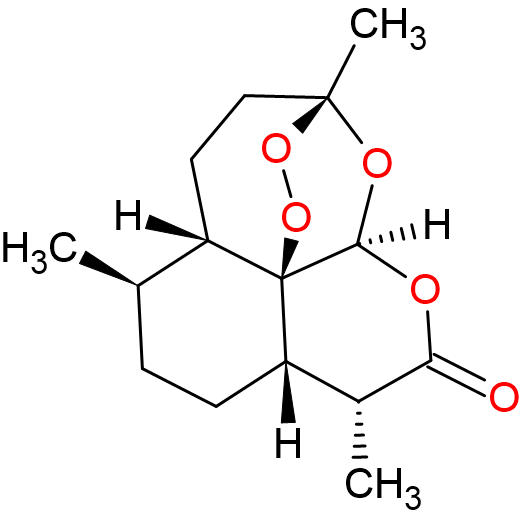
This representation is familiar to chemists, who visualize molecular structures routinely. However, for a computer, interpreting such a visual representation as an image is difficult. To address this, computer scientists represent chemical structures in a data structure more suitable for computation: a Graph. In Graph Theory, graphs are composed of Vertices (atoms) connected by Edges (bonds). Each atom can carry additional information, such as atomic number, weight, charge, or hybridization. Bonds can also store details, including bond order or aromaticity. This graph can be described to a computer using a connection table, which is commonly found in many chemical file formats. The connection table typically consists of two parts: a table of atoms with their IDs and properties, and a table describing how these atoms are connected. Examples of chemical formats that use connection tables include:
- MDL format (.mol files): This format is mostly used for small molecules. It lists the atoms along with their coordinates, followed by a bond table that describes how atoms are connected, the type of each bond (single, double, etc.), and the order of connections.
In the following example, a sample MOL file demonstrates the main parts of the format. The first and second lines contain the compound name and the name of the software package that exported the file. The fourth line is the count line, which provides the counts of certain features in the molecule (for example, 37 for the number of atoms and 39 for the number of bonds). The atom block lists each atom on a separate line. Each line starts with the 3D coordinates (x, y, z) of the atom, followed by the atom symbol. Following the atom block is the bond block, where each line represents a bond. The first column indicates the row number of the first atom in the atom block, the second column indicates the row number of the connected atom, and the third column specifies the bond type (single, double, aromatic, etc.).Compound_2 RDKit 3D 37 39 0 0 0 0 0 0 0 0999 V2000 -6.6827 -1.6970 0.2630 O 0 0 0 0 0 0 0 0 0 0 0 0 -5.3593 -1.3450 0.2503 C 0 0 0 0 0 0 0 0 0 0 0 0 -4.3807 -2.3373 0.2392 C 0 0 0 0 0 0 0 0 0 0 0 0 -3.0327 -1.9762 0.2254 C 0 0 0 0 0 0 0 0 0 0 0 0 -2.6590 -0.6269 0.2106 C 0 0 0 0 0 0 0 0 0 0 0 0 -3.6570 0.3618 0.2397 C 0 0 0 0 0 0 0 0 0 0 0 0 ... 1 2 1 0 2 3 2 0 3 4 1 0 4 5 2 0 5 6 1 0 6 7 2 0 ... - SDF Format (.sdf or .sd files): This format is an extended MDL mol file format that supports storing additional custom variables to the structure. Also, SDF file can hold more than one molecule in one file.
- PDB Format (.pdb, .ent): This format is mostly used for biological macromolecules structure such as proteins and DNA but can also be used for small molecules.
Another way to describe molecules is using linear notation, which represents the structure as a single line of text. The main advantage of this approach is that the notation can be easily copied and pasted into database search engines. It is also generally easier to read than connection-table formats. However, linear notations only capture the molecule structure and cannot store 3D configurations. The most popular linear notation is called SMILES, which stands for Simplified Molecular Input Line Entry Specification.
SMILES:
In SMILES Atoms are written by their symbols like C, N, H, etc. Atoms that are directly connected by a single bond are written next to each other. For example, CCC represents propane.
Note: Hydrogens are often left out in these notations. These are called implicit hydrogens because most software can guess how many hydrogens are needed based on the atom valency, charge, and number of bonds. But in some cases, like 3D modeling, you may need to have explicit hydrogens to give them a location in the 3D space.
To represent double and triple bonds, we use = and #.
For example:
C=CCfor 1-propeneC#CCfor 1-propyne
If the molecule has branches, we can use parentheses to show them:
N(CCC)(CCC)CCCfor triethylamine
For charged atoms, we write the atom in square brackets with its charge:
[NH+](CCC)(CCC)CCCfor triethylammonium
For stereochemistry, we use @ or @@:
C[C@H](C(=O)O)Nis R-alanineC[C@@H](C(=O)O)Nis S-alanine
For rings, SMILES uses numbers to show where the ring starts and ends:
C1CCCCC1is cyclohexane, a 6-membered carbon ring.
You put the same number next to the atoms where the ring closes.
For aromatic rings, lowercase letters are used.
For example:
c1ccccc1is benzene- Aromatic nitrogen is written as
n, like inc1ccncc1for pyridine
InChI:
InChI is another line notation that can describe the molecule structure. It was originally developed by the IUPAC since 2000. It is less human readable but more suitable for databases. In contrast to SMILES where the same molecule can be drawn using multiple SMILES, InChI is unique for each chemical.